
Yes, but the license plate must set as required for all Reservation providers. If an license plate is not added to the reservation and the parker is also an autopay user, they could be doubled-charged.
Express Pay is a digital payment option powered by the ParkWhiz platform and supported by both Parkonect and Flash PARCS. It gives drivers a seamless, contactless way to pay for parking using their license plate as their credential.
How It Works
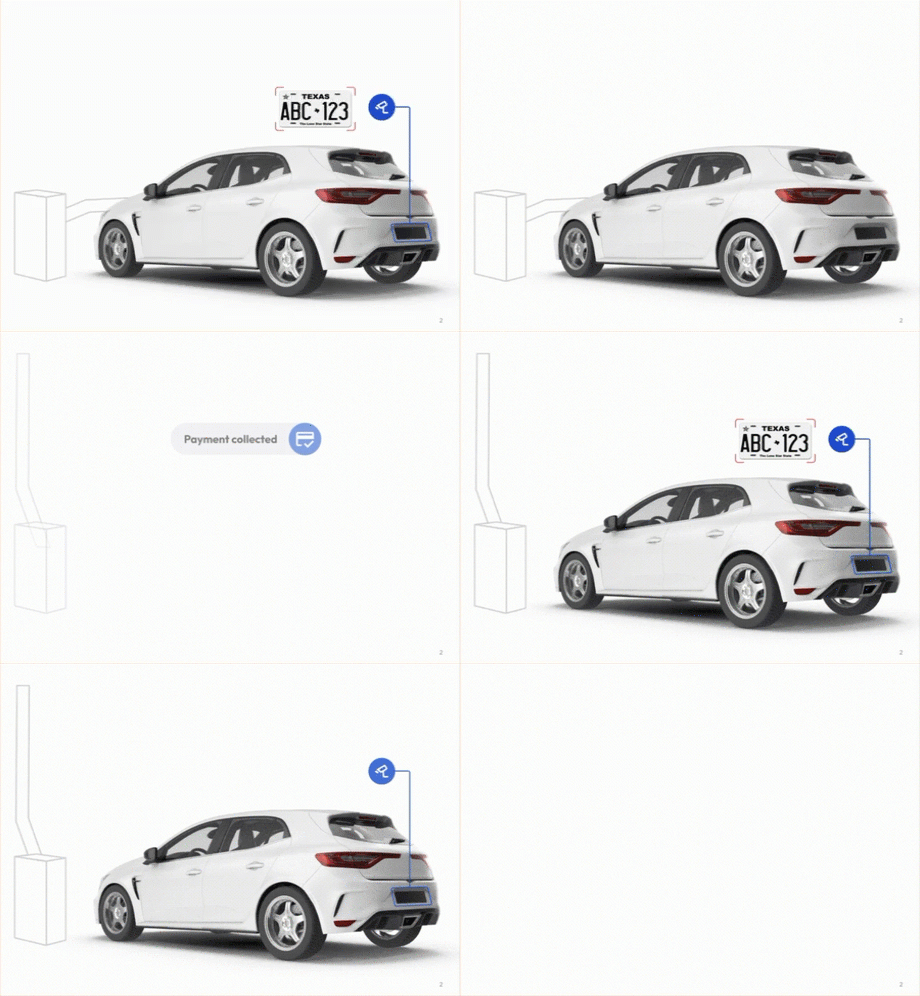
Express Pay is a fast, mobile-first payment option for Flash PARCS and Parkonect. Explore setup guides, FAQs, and best practices below.
Can a location implement eParking and Express Pay at the same time?
Yes, but the license plate must set as required for all Reservation providers. If an license plate is not added to the reservation and the parker is also an autopay user, they could be doubled-charged.
Is Express Pay compatible with Valet?
This non-compatibility applies to:
Note: There is a Valet API available with Parkonect that is ready for alpha location testing. Reach out to Parkonect Product team if the location is interested in being a test site.
Can a reusable QR code be displayed to apply a validation discount?
Yes. In Flash PARCS, a Non-Burnable Coupon can be converted into a reusable QR code. You can set a maximum number of uses and define the applicable logical zone where the discount applies.
Are Nested Areas compatible with Express Pay?
Yes, if using Nested Enforcement for transients can you charge a user an additional fee for parking in a specific parking area (e.g., VIP or premium zones) and the updated rate can be paid via Express Pay.
Can a driver use a gift card with Express Pay?
Gift cards issued by major card networks (Visa, Mastercard, American Express) are accepted with Express Pay.
Can you still use a POF or a door reader when you start an Express Pay session?
Yes, Express Pay provides a digital ticket with a QR code that can be scanned on a door reader for access. If utilizing Hybrid or Free Flow mode with Parkonect, and choose not to sign up for Express Pay, the POF allows you to look up your License Plate for payment.
Can an eparking Reservation holder pay for an overage fee via Express Pay?
No, Express Pay can’t be started if the driver entered with a reservation. All overage fees must be paid at a kiosk (POF or exit).
Can you still apply validations when you use Express Pay?
Yes! Express Pay provides a digital ticket via SMS and there’s a link to apply a discount. Both Flash PARCS and Parkonect Validation and coupon barcodes can be scanned to apply a discount.
How does Express Pay differ from Digital Ticket Checkout?
DTC vs. Express Pay
While there are several differences between DTC and Express Pay, the primary distinction is when payment is processed.
User Process and other differences
DTC:
Express Pay:
Can I get a receipt for my Express Pay session?
Yes. A digital receipt is sent to the email address associated with your Express Pay account.
Can I use Apple or Google Pay when adding a payment method?
No. Express Pay registration does not offer the option to add a credit card via Apple/Google/Samsung Pay.
What happens if a Express Pay customer’s credit card is declined?
If the payment method on file is declined, the driver receives an automatic SMS notifying them of the failed payment. The message includes a link to update the payment method and pay the outstanding balance.
For autopay users, entry gates will still vend on their next visit to an Express Pay garage. However, they will receive an automatic SMS stating that a session could not be started. To begin a new session, they must manually update their payment method.
Express Pay cannot be used again until the outstanding balance is resolved, so users are only allowed one failed payment.
How can a user update their license plate or payment method?
During an Express Pay session, users can update or add a new payment method at any time before exiting. When manually starting a session, they can also add or edit license plates.
Can an Express Pay user remove the credit card on file after a session has started?
No, the only way to delete a credit card is through your ParkWhiz account, either in the mobile app or at www.parkwhiz.com. If a card is removed after an Express Pay session has started, the card used for that session will automatically be added back to the account once the driver exits. This prevents a loophole of allowing a failed payment.
Does the Express Pay ticket provide the rate estimate?
No, Express Pay currently does not provide a Rate Estimate to the user. This is currently in developement and will be available in the future. The digital ticket does instruct the driver to “See onsite signage for rates.”
Can I cancel an Express Pay session?
Yes! Session Cancellation is now an option for Express Pay users. All Express Pay users have the option to cancel the Express Pay session, which unlinks the transient ticket from their Express Pay account. A Transient ticket QR code is still provided to the driver to use on exit, validate, POF, or a ped door access.
What if I’m driving a rental car, can I still use Express Pay?
When using a rental or temporary vehicle, the Express Pay enrollment process allows you to mark the license plate as temporary.
What happens when a parker forgets to check that they are using a rental car?
If a parker is driving a temporary or rental vehicle and uses Express Pay for a one-time payment without selecting the “Temporary Vehicle” option, the license plate will be added to their account linked to their mobile number.
If another driver uses the same vehicle at an Express Pay garage, they may receive an SMS notification if the location has Proactive Comms enabled.
If the original driver enrolled in autopay for that temporary vehicle, subsequent drivers using the same vehicle could trigger automatic charges at Express Pay garages.
Removing a Vehicle from an Account
The user can remove the vehicle by:
Can you have Express Pay users pay a specific rate?
No. The rate is assigned based on the entry ticket and Express Pay users will receive the active rate at the facility.
Can you have Express Pay at specific Logical Zones?
Yes. In Flash PARCS, Express Pay can be configured for certain Logical Zones while others remain standard. Campus Mode is supported in Looker reporting, unless the Logical Zones require separate merchant accounts.
Can you enable Express Pay only on certain lanes?
No. Express Pay is configured at the location level and can’t be disabled for specific lanes. Just not installing LPR on specific lanes would bypass the use of Express Pay.
What happens if I drive a car I didn’t enroll into Express Pay?
If the new car isn’t registered with Express Pay, the system won’t recognize it, and a session won’t start. You’ll need to pay manually at the exit or register the new vehicle.
Can you have multiple vehicles enrolled in autopay?
Yes, you can have multiple license plates listed on your ParkWhiz account enrolled in autopay, but an Express Pay user can only have one open session at a time.
Can the same license plate be listed under multiple ParkWhiz accounts for Express Pay?
Yes, the same license plate can be listed under multiple ParkWhiz accounts, and all account holders will be able to use Express Pay (one-time payment) for that vehicle. However, a license plate can only be enrolled in Autopay under a single account.
Can you enroll your license plate for Express Pay before arriving to at the garage?
Offsite registration isn’t supported by ParkWhiz, to register or start an Express Pay session, the parker must first enter the garage and have their license plate captured by LPR.
Offsite registration is supported through the ParkMobile app “Camera Parking” feature.
Can parkers proactively add and delete credit cards/vehicles on their account?
Yes, a parker can log into their ParkWhiz account and add or delete vehicle license plates and credit cards on file. Removing them from ParkWhiz account, removes them from auto-populating for an Express Pay session.
Does Express Pay required a cell signal?
Yes. Express Pay requires a cell signal to receive text messages and an internet connection to manually start a session. If cell connectivity is limited inside the garage, customers should be instructed via signage to start their Express Pay session or check text messages during their stay, in an area with better reception.
Can you still use Express Pay during an offline event?
If the garage is online at entry (before going offline):
If the garage is offline at entry (no internet connection at the time of entry):
Does Flash PARCS offer Flex?
No. Flex Operating Modes –Full Control, Hybrid, and Free Flow are only available with Parkonect.
Hybrid and Free Flow allow the entry gate to automatically vend on a successful LPR read, so drivers skip kiosk interaction. The license plate read serves as the “ticket,” removing the need to press a button or pull a ticket at entry.
Full Control keeps gates down at entry and requires kiosk interaction, except for registered Auto-Pay users who still receive an automatic vend. At exit, gates vend automatically for both Auto-Pay and one-time Express Pay users.
Flash PARCS by default functions exclusively in Full Control mode and doesn’t offer the option to switch to other modes.
What happens when a parker enters their plate in the app and they get an error that there are no matching plates?
How does a parker know which garages are Express Pay–enabled? Will they be able to tell while driving around?
On-site signage is used to indicate that Express Pay is available at a facility, so drivers know before starting their session. Express Pay labeling is not available through the ParkWhiz app or website at this time.
Can we use Express Pay with other LPR systems (Uncanny, HTS)?
No, we are only implementing Express Pay with Vision.
Can we use Express Pay with no gates installed?
No. Gates are always required.
Can DTC Signs be converted into Express Pay Signs?
No, new signs will need to be created with new beacon QR Codes.
Earn your Express Pay Sales Certification today!