
| CPQ | Pilot Stage |
| Hardware Kit Specs | n/a |
| Known limitations | -No email alerts on denials -Nested Kiosks are not supported -Lanes (baby lanes) are not supported |
| Offline Mode | -Blacklist Denials supported -Blacklist Alerts not supported |
| Requirements | -LPR Installed -Flash Monitor User account -Flash PARCS version 4.0.3.8 |
| Marketing Assets | coming soon |
| L&D Courses | coming soon |
This feature is currently in PILOT STAGE and should not be implemented until officially released.
Flash PARCS supports a License Plate Blacklist feature, allowing operators to restrict access or receive email alerts for specific vehicles captured by the LPR (License Plate Recognition) system. All integrated LPR systems with Flash PARCS support this feature.
- Vision
- Uncanny
- HTS
‼️ Note‼️
The Blacklist applies to any license plates, whether transient parkers or registered monthly parkers.
If a license plate associated with a monthly parker is set to Deny, it will override their normal access privileges and prevent entry or exit.
Adding License Plates to the Blacklist #
Access to the Blacklist tab in the Flash Admin portal requires a Flash Monitor user account until further development phases are complete.

- Log in to Flash Admin
Navigate to the Location, then select the Blacklists tab from the top menu. - Select “Add New”
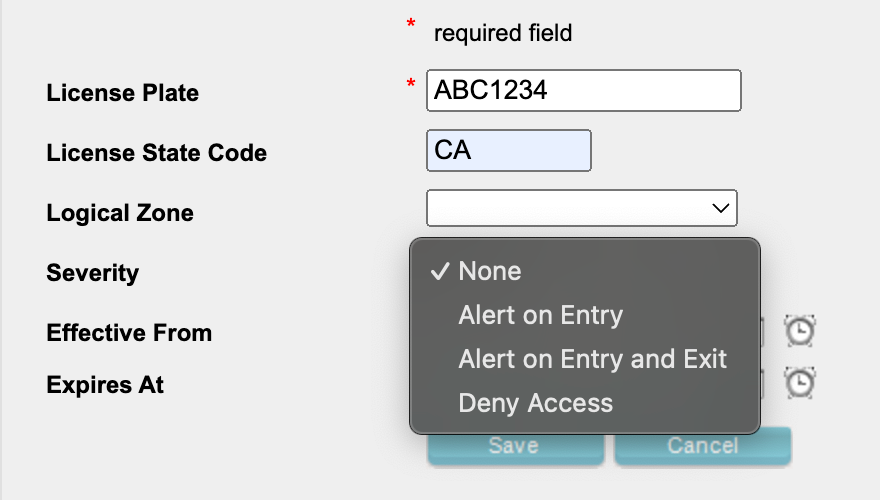
- Enter License Plate Details
- License Plate Number (required)
- License Plate State (not required)
- Define Logical Zone (Optional)
If the location uses Logical Zones, you can restrict the blacklist to specific zones.- Leave blank to apply to all Logical Zones.
- Set Severity
Choose how the system should respond when the license plate is detected:- Alert on Entry: Sends an email notification when the plate is captured at an entry kiosk.
- Alert on Entry and Exit: Sends an email when the plate is captured at either an entry or exit kiosk.
- Deny Access: Prevents access at both entry and exit. The kiosk displays a “License Plate Restriction” message.
- Set Effective and Expiration Date/Time (Optional)
- If left blank, the license plate will become active immediately and remain active indefinitely.
- You can also configure the blacklist to start or end at a specific future date and time.
- Save. Select the Blacklists tab on the top menu to return to the full Blacklist view.


Note
Blacklist changes—whether adding or removing a license plate—take effect within 5 minutes of being saved.
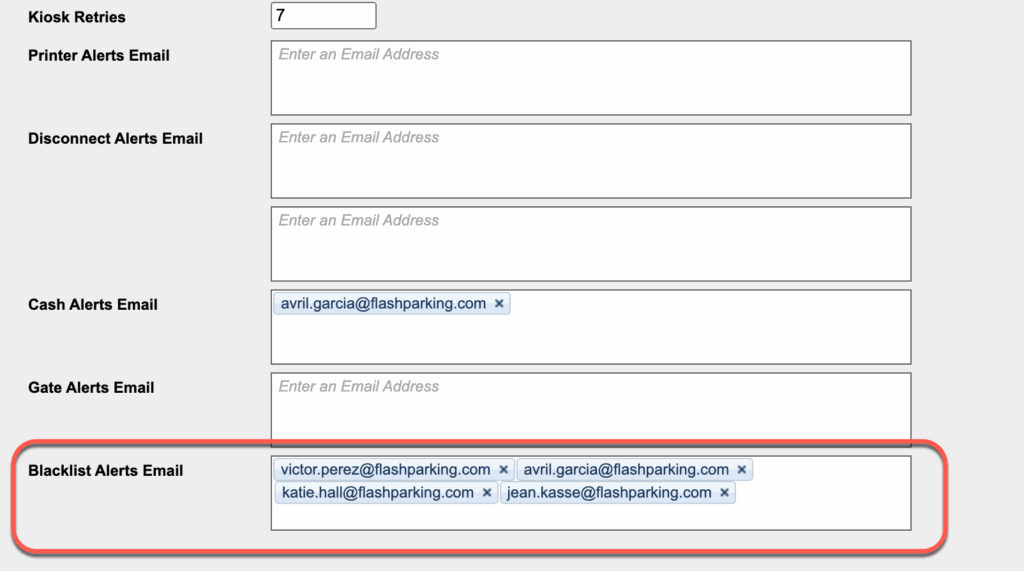
Set Blacklist Alert Email Addresses #
- Log in to Flash Admin
Navigate to the Location, and under the Location Details page, scroll to the Email Alerts section. - Enter each email to receive the Blacklist email alerts.
- Save
‼️ Note‼️
Email alerts can only be set at the Location and are not available at the Logical Zone level.
Email Alert Example #
Included Information:
- License Plate
- Location Name
- Date and Time

Blacklist Denials #
Blacklisted License Plates set to Deny Access will receive the following kiosk screen message on either the entry or exit kiosk, requiring them to contact Support for assistance.
All vend options are available to assist the restricted parker.
- Press 5
- Advanced Customer Support portal
- Flash Valet app


Blacklist Reporting #
On-Demand Reports #
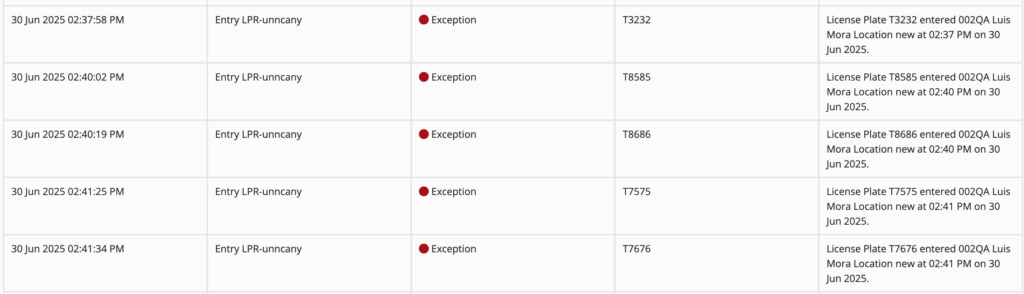
The Kiosk Exceptions and Denials report lists all Blacklisted License Plate alerts. Denials are not currently being recorded.

Flash Log #
Currently, only Alert activity is recorded in the FlashLog, Denials are not included.
Offline Mode Compatibility #
The LPR Blacklist remains active during offline events.
- Alert plates will not trigger email notifications while the system is offline.
- Deny Access plates will still be blocked at entry and exit as configured.
Notes #
Blacklist is currently in Phase 1 of development. Note the current limitations.
- Email alerts are not sent when a LP is set to Deny Access.
- Denials are not recorded on the Kiosk Exceptions and Denial report or Flashlog.
- The Customer Support portal does not note that the caller’s LP is on the Blacklist.
- The Flash Valet app does not include Alert or Denial notes on tickets.
- Submitting duplicate license plates with different severities causes override issues.
- Nested kiosks are not supported with the Blacklist feature.
- The Blacklist feature does not support locations with configured baby lanes.