
To know more about this feature read the main document: Overnight Self-Park Module
Overnight Self-Park Ticket Type #
- Create a new Ticket Type with the following options and flags:
- Name: Overnight Self Park
- Require Name ✓
- Show Checkout ✓
- Monthly Parking ✓
- Flash PARCS ✓
- Uncheck “Show in Summary”
Create Overnight Price #
- Create a new Price (Added at Ticket Type level):
- Name: Overnight
- $0 Price
Create Late Check Out Price #
- Name: Late Checkout Price
- Late Checkout Price (Added first at the overnight Ticket Type level)
- Flat rate or use Flash Rates tool for a calculated rate.
- Set Late Checkout Time. (if the parker leaves after the set late checkout time, they will be charged the Late Checkout Price).

For more information on creating Late Checkout Price, see this page.
Overnight Pass Prefix (Monthly Parking Code) #
- Assign a 3-digit monthly prefix under the Monthly Module Alpha Prefix spreadsheet
- Add prefix to Company > Monthly > Details > Monthly Parking Code; Save.
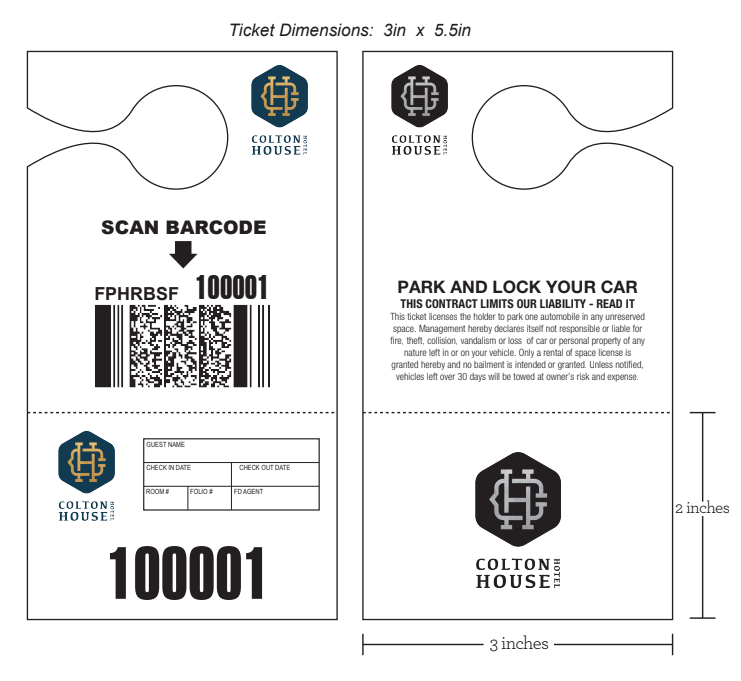
The barcode on the overnight pass must include the “monthly prefix” along with FPHR.
Overnight Pass Examples #
The barcodes on the passes or hangtags must follow this format:
- FPHR prefix + Monthly Parking Code + Barcode number
- Sample barcode: FPHRRBSF100001
Flash App User Account #
A user account with Hotel app access is required to log into Flash App.
- Users – Assigning a Hotel to a User
- Create a user with the following details: (example)
- Email: overnightpass1@location.com
- First Name: Overnight Pass 1
- Last Name: Location Name
- User Type: Dispatcher
- Check the “Hotel App” Flag ✓
- Location: Select the Location from the drop-down menu
- Roles: Administrator
- Password: create a password
- Create a user with the following details: (example)
Report Groups #
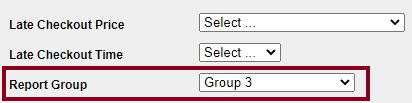
Adding a Report Group is an option feature to add to the Overnight Ticket Type, Report Groups keep tracking of occupancy overages based on the set capacity limit per Report Group.
Configuration #
Go to the Overnight Self Park Ticket Type and select the Report Group from the Report Group dropdown.
The Report Group(s) must have been previously created. Submit a CS Ticket to Dev to get the Report Groups created.
Sample Request:
- Report Name: Group 1
- Price: Overnight
- Capacity: 20
Passback Settings #
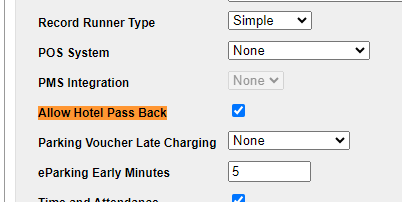
The passback settings for Overnight Self Park Passes are found at the Company > Location > Details page.
By turning on Allow Hotel Pass Back, all overnight passes will be granted passback privileges.
Note: If there are any active passes when passback is enabled, these passes will not be granted passback rights. The same applies when passback is disabled. The passback settings only affect passes that are issued after the setting change.
Using A Hotel Key Card (PMS Integration) #
If there is an active, configured PMS integration for the location, a supported hotel key card can be utilized as an entry and exit method.
Portal Configuration #
- Location Details
- POS System (This is configured by the Integrations Team)
- PMS Integration (This is configured by the Integrations Team)
- Ticket Type:
- Name: Overnight Self Park Keycard
- ✓ Require Name
- ✓ Show Checkout
- ✓ Monthly Parking
- ✓ Flash PARCS
- ✓ Take Off: Show in Summary
- Price (Added at Ticket Type):
- Name: Overnight
- Flat Rate Price