Some LPR-enabled locations allow vehicles to move between multiple areas (Logical Zones) that share a common exit. To maintain accurate vehicle counts in these environments, LPR can be configured to automatically transition vehicles from one Logical Zone to another.
This capability requires Flash PARCS version 3.3.0.0 or later and the setup of a hidden LPRTransition kiosk. An additional LPR controller must also be configured to support the zone transition.
FlashPARCS Version updates #
| Kiosk Version | Update |
|---|---|
| 4.0.6.0 | Fixes issues where occupancy counts and pricing were not updating correctly during vehicle transitions between logical zones when using FVR LPR cameras. |
Note
This setup is supported by both Uncanny LPR and Vision FVR cameras. For automated rate changes when a vehicle moves from one parking area to another, see: Parking Areas
Requirements: #
- Flash PARCS 3.3.0.0 or higher
- A Flash Vision controller
- A Flash Vision Hidden Transition Kiosk (see below)
How it Works #
In this mode, the kiosk will accept every single LPR event, even if it doesn’t have a plate, and with any confidence level. When an LPR event is received by this kiosk, if the event has a license plate, it will find the active ticket with that plate (Monthly or transient) and move that ticket to its new logical zone.
If the LPR event does contain a plate that is not found (mismatch or misread), Flash Core will find the oldest active ticket and move it to its new zone. If the LPR event does not contain any license plate, Flash Core will again move the oldest ticket to the new zone.
The POF controller will always be on the main POF screen, accepting all LPR events.
Hidden Kiosk Transition Configuration #
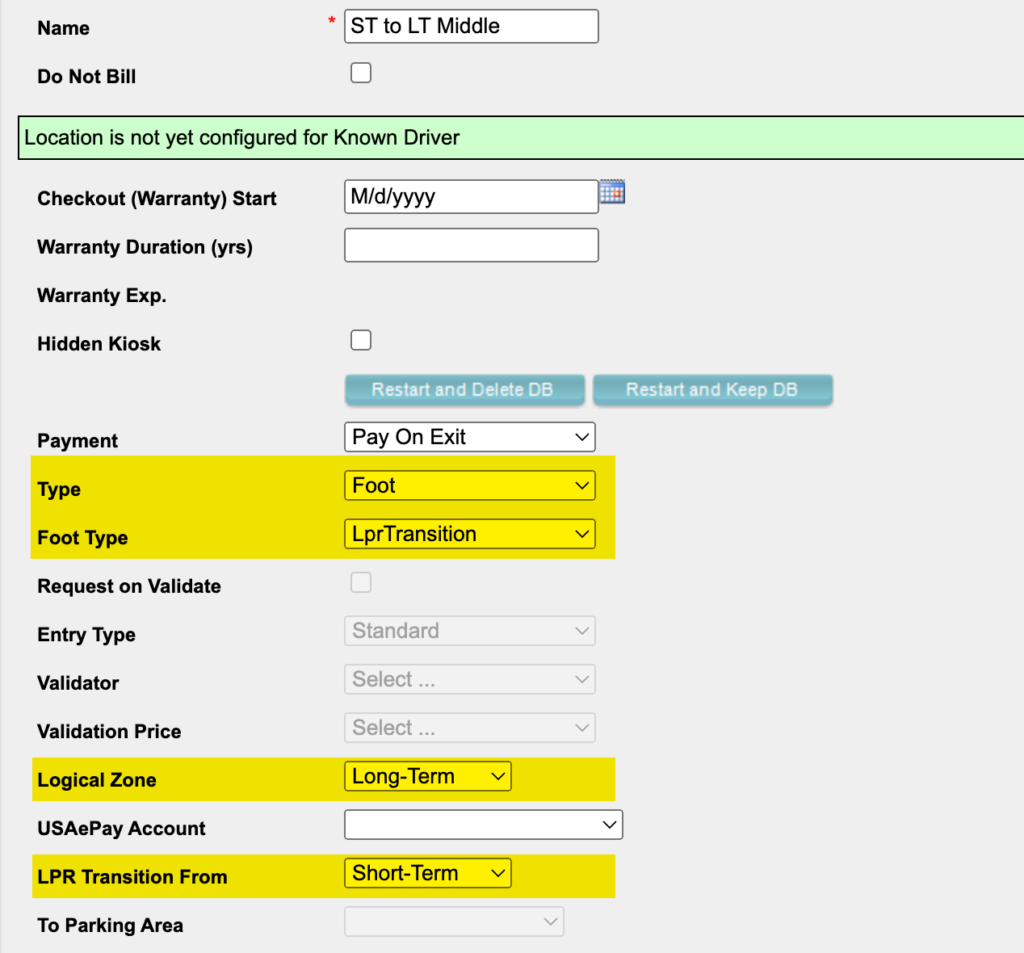
- In the Admin Portal, go to Location > PARCS Kiosks tab > Add New
- Kiosk type: Foot
- Foot Type: LPRTransition
- Logical Zone: The Logical Zone the vehicle is transitioning to. If the vehicle is moving from Zone 1 to Zone 2, this field should be Zone 2. (This is the Logical Zone for the shared exit)
- LPR Transition from: This is the Logical Zone the vehicle is leaving. If the vehicle is moving from Zone 1 to Zone 2, this field should be Zone 1.
- LPR Type: Flash Vision
- Flash Vision IP Address = IP of the Flash Vision controller from the transition camera LPU