
Multipass parkers are allowed multiple entries and exits at a Flash PARCS location using the same Arrive barcode. Multipass search can be filtered by several categories, allowing for fast access and editing.
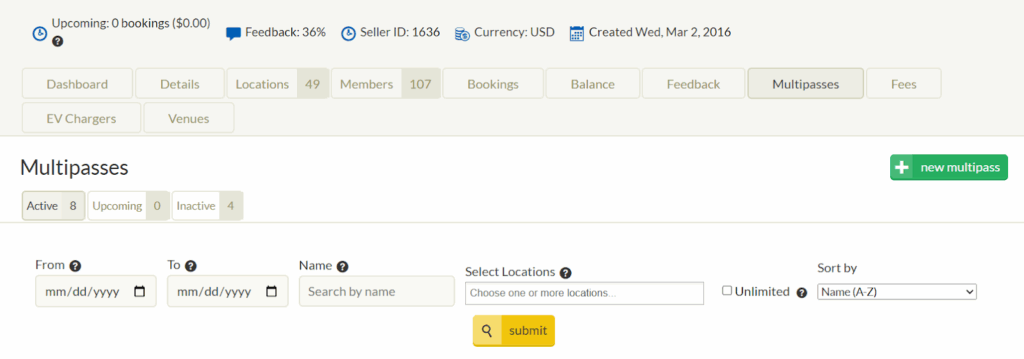
MultiPass Filtering #
Note
Filtering categories by Active, Upcoming and Inactive have the same filtering fields.
- From: Show Multipasses that start after this date.
- To: Show Multipasses that end before this date.
- Name: Show Multipasses whose name contains the text presented in this field.
- Select Locations: Show Multipasses that are available to the selected locations.
- Unlimited: Flag that shows any multipasses that have no restrictions on any number of uses or number of concurrent uses.
- Sort By: This dropdown filters passes by options of Name (A-Z or Z-A), Created Date (newest or oldest), Total Uses (most or least), Active Tickets (most or least), and Usage Window (earliest or latest).
After selecting the desired search parameters, click the Submit button to populate results.
Results #
Results will populate in the lower part of the screen, showing columns for Name, Created At, Active Tickets, Total Uses, and Multipass Use Period.
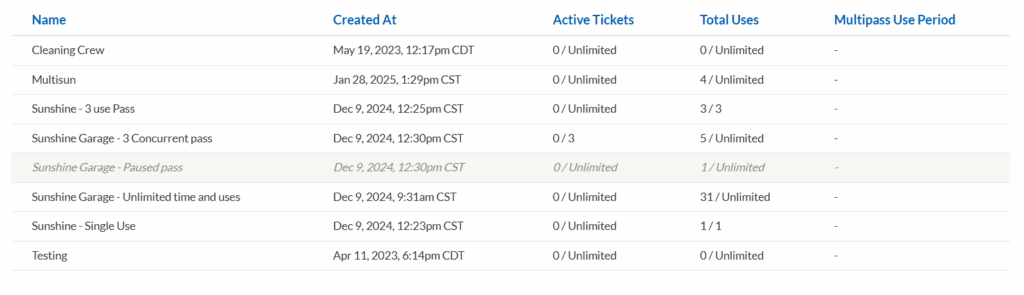
- Name: Will show the Multipass’ name.
- Created At: Creation date for the Multipass, if the pass was created in a date that falls between the From or To fields when specified, it will be shown in the results
- Active Tickets: Currently active tickets for the Multipass.
- Total Uses: The total amount of Multipass uses.
- Multipass Use Period: When available, any use period will be shown here.
Note
If a Multipass has been marked as Paused, it will be shown grayed out in the results.