
Also known as: in-lane cashier, in lane cashier, cashier booth
For facilities that utilize a cashier booth, Flash PARCS supports the use of an iOS device to take payments at the exit.
Configuration #
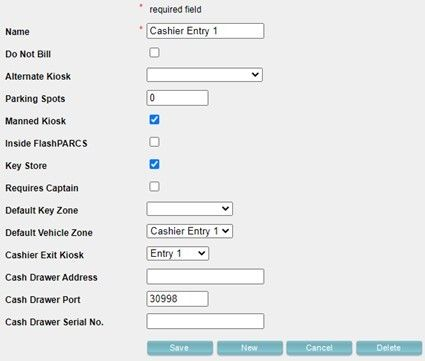
Cashier Kit Kiosk Configuration
- Go to the location, open the Kiosk tab –> Add New
- Make naming convention separate from the PARCS kiosk name (e.g.: Exit 1 can be named Cashier Exit 1)
- Leave the default settings: Manned Kiosk, Key Store, Cash Drawer Port
- Select the corresponding PARCS kiosk under the Cashier Exit Kiosk dropdown (do not connect to a lane if the kit is set up in an office) –> Save
- Open the newly created kiosk and you should now be able to see it as an option in the Default Vehicle Zone drop-down list and select –> Save
Configure Cashier Lost Ticket (Ticket Type) #
NOTE: If the Cashier Kit is in a booth and not at an exit kiosk, processing a Lost Ticket at the cashier kit will not produce a barcode for parker’s exit. The parking operation needs to define a protocol to let these parkers out after they pay a Lost Ticket fee in a booth or office.
Configured if connected to a lane
- Go to Ticket Types –> Add New
- Enable the following flags and hit Save
- Name – Cashier Lost Ticket
- Show Paid
- Show in Summary
- Confirm Price
- Flash PARCS
- Flash PARCS Lost Ticket
- Pay and Display
- Self Park
- Go down to Add Ticket Type Price section –> Add New
- Name – Cashier Lost Ticket
- Enter in the Amount
- Flag as Lost Ticket Price –> Save
- Go to Prices and click the Cashier Lost Ticket
- Enable Is PrePaid & Is Self Park –> Save
Add Cashier User #
- Go to Users –> Add New
- Enter in Email Address, First Name, Last Name. E.g.: Cashier 1, cashier1@LocationName.com
- User Type – Dispatcher –> Save
No roles will need to be selected, can flag Reports Only if necessary.
Keys to Success #
- All Cashier Kits comes with an iPad scanner
- If you don’t want a full-blown Cash Machine, the Cashier Kit is the way to go
- FDMS or Global will not work with MP200 devices
- If Cashier Kit is in a booth and not at an exit kiosk, processing a Lost Ticket at the cashier kit will not produce a barcode for parker’s exit. The parking operation needs to define a protocol to let these parkers out after they pay a Lost Ticket fee in a booth or office.
- In the location details, assign an email to Email Shift Summary to send reporting for cashier kit
- For text receipts, will need to assign a Dedicated Number