
Operators are able to bulk import parkers to an existing account. This is commonly used for when a large batch of parkers is signing up and the operator doesn’t want to add them manually.
Things to note:
- Any parkers imported whose start dates fall in a period that has already been invoiced for will need to be sent an invoice manually by the operator.
- Imported parkers need to be synced to the PARCS equipment by pressing the sync button on the advanced tab after the import.
- If you are trying to move parkers from one account to another, you can follow the bulk import instructions bellow but also remember to:
- Fill in the import template using parkers copy +pasted from the Permit Holders report.
- Upload it, then delete the parkers from the old account before syncing both accounts with the PARCS system.
How to bulk import:
1- Open an existing account and go to the Advanced tab. If the account you want to bulk import parkers to doesn’t exist yet it can be added via the “Add Customer” form.
2- Click the button that says “Start an Import”.
3- Follow the instructions on the popup screen.
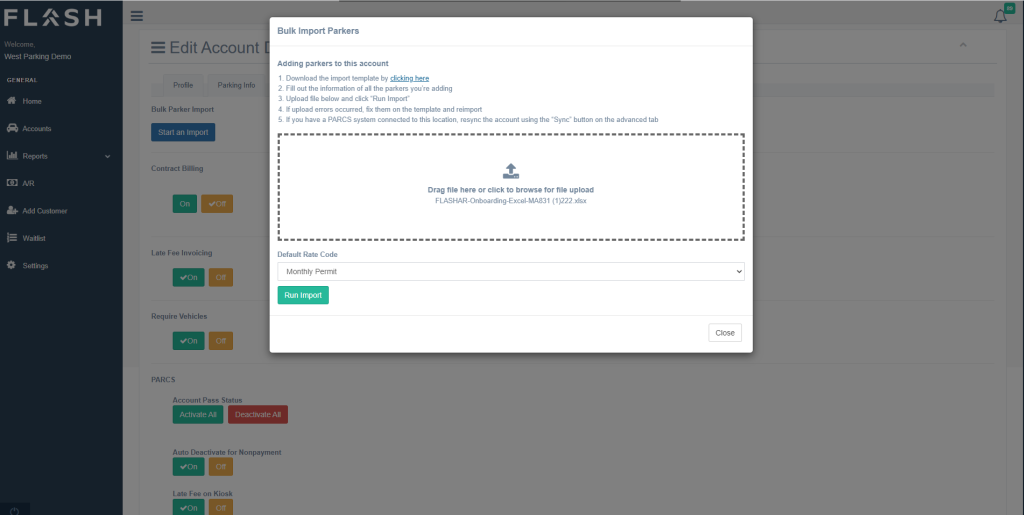
4- Sync the account to add these parkers to the PARCS System.