
The Flash Admin Portal will need to be configured to ensure the Amount Due screen, Ethernet cash drawer and Flash Valet app are able to communicate properly.
To enable Amount Due functionality, the Calculate Change flag will need to be checked on the Details tab at the Location level.
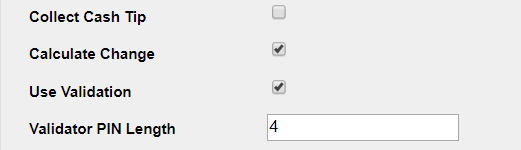
For each Amount Due screen that will be used, a kiosk will need to be set up in both the Kiosk tab and in the Flash PARCS tab for the valet location.
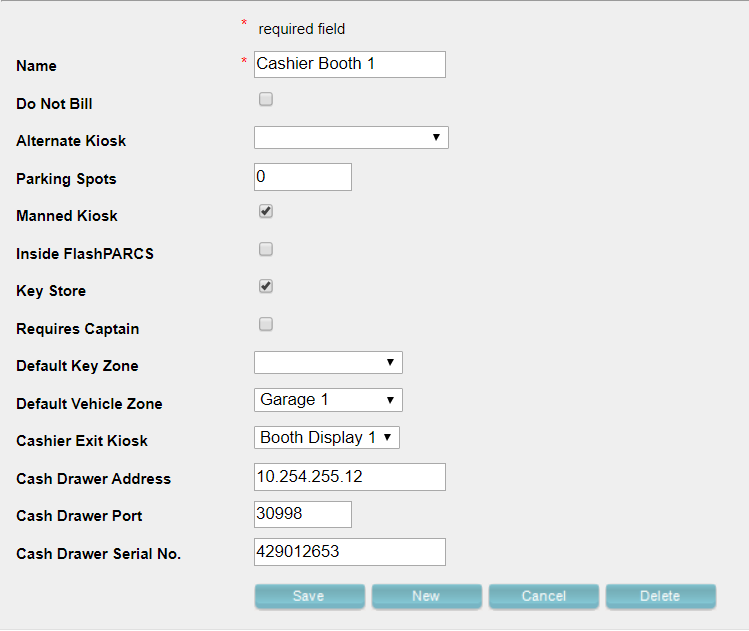
Take note of the new options presented when creating a valet kiosk in the Kiosks tab:
- Cashier Exit Kiosk – The corresponding Amount Due kiosk set up in the Flash PARCS tab
- Cash Drawer Address – The IP address assigned to the Ethernet cash drawer (you can find the IP of the cash drawer using the APG Cash Drawer Utility)
- Cash Drawer Port – The port that will allow the Flash Valet device and drawer to communicate (set to 30998 by default – you should not need to change this)
- Cash Drawer Serial No. – The serial number assigned to the Ethernet cash drawer (found in the APG Cash Drawer Utility)
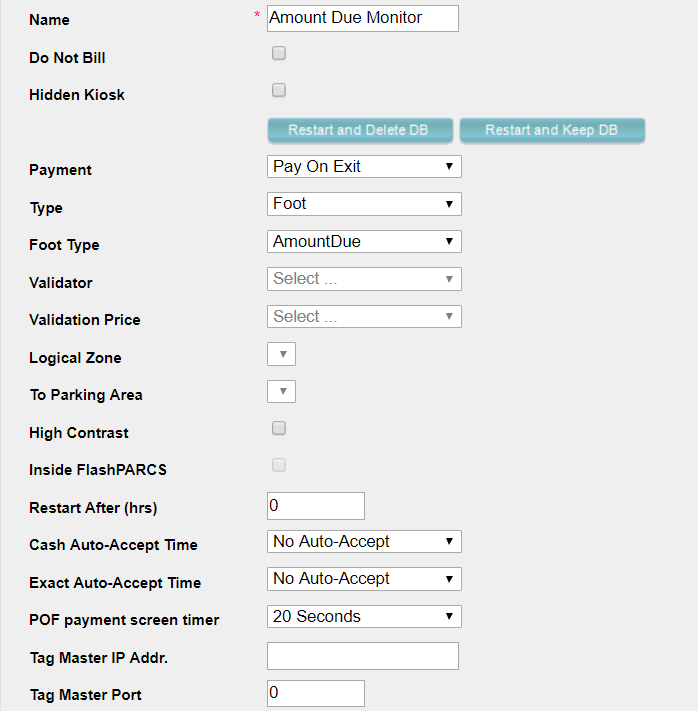
Amount Due Monitor in the Flash PARCS tab
Note that the only requirement when creating the Cash Amount Due monitor is to select it as an AmountDue Pay-On-Foot kiosk.
Once the valet and Flash PARCS kiosks have been configured in the portal, the Flash Valet tablet will be able to connect to the Ethernet cash drawer and to the Cash Amount Due monitor running Flash PARCS.